Find the stocks that match your rules, the moment they match.
Write what you’re looking for in plain words. SEPT turns it into an exact rule, reads it back to you, and scans every U.S. stock in real time, so you see stocks as they come in and drop out.
Build a screener freeNo code. 400+ fields, including SEPT’s own data from every trade.
Type it like you’d say it
“Up more than 3% today, above VWAP, and volume is twice its normal pace.” SEPT translates that into an exact rule and shows it back to you, line by line, before anything runs. If a word is unclear, like “strong” or “extended”, it asks what you mean instead of guessing. Chinese works too.
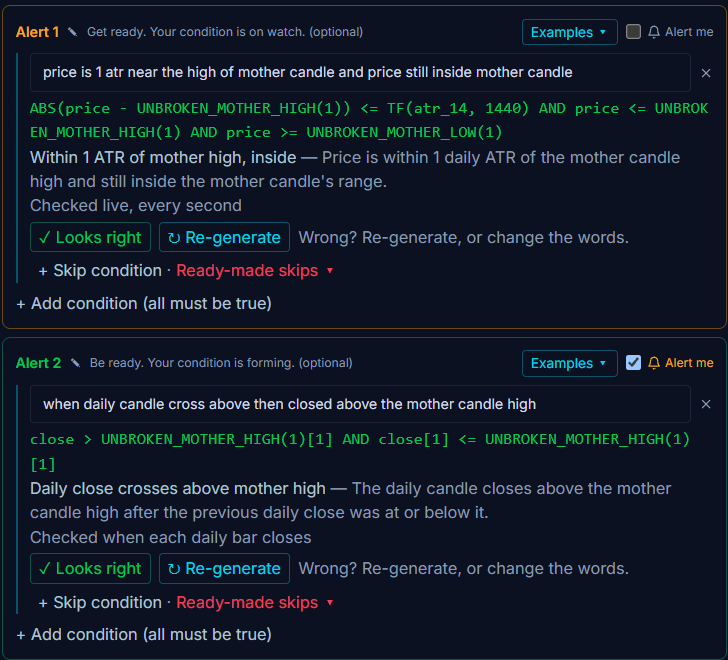
- 1
Your rule, in your words.
- 2
The exact rule SEPT will run.
- 3
Read back to you in plain English.
- 4
Wrong? Re-generate or change the words.
Stocks come in and drop out as price moves
Many screeners give you a list that was already old when it loaded. A SEPT screener runs live in every session, premarket and after hours included. When a stock starts matching, it shows up; when it stops matching, it leaves. Price columns refresh every second, and bar-based columns refresh when each bar closes.
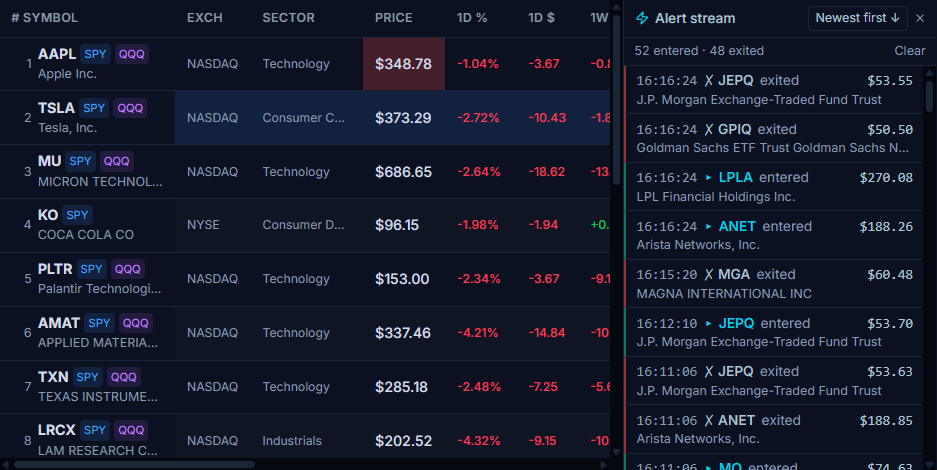
- 1
Stocks matching right now.
- 2
Columns you choose, saved to your account.
- 3
Live: stocks enter and exit as prices move.
Screen on what actually traded
Besides price, volume, indicators and fundamentals, you can screen on SEPT’s own data, built from every U.S. stock trade:
Pressure
Real buying vs. selling from every trade.
Key levels
Premarket, previous day, VWAP, pivots and supply and demand zones, plus what price did at each level before.
Swing structure
Confirmed swings with the volume and pressure behind them.
Volume compared with normal (RVOL)
Plus candle shapes and chart patterns.
Also in the screener: options activity, dark pool prints, insider and congress trades, earnings and filings.
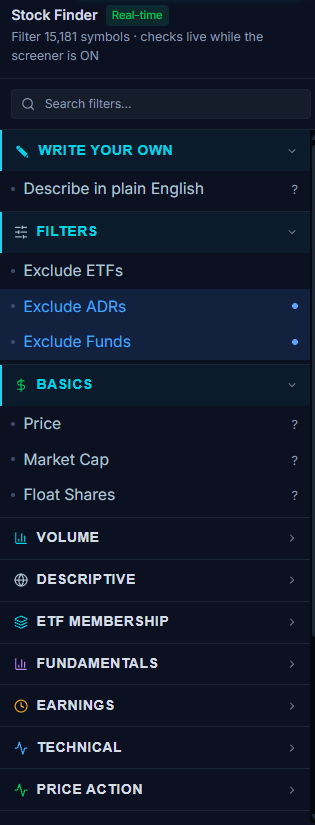
- 1Or just describe it in plain words.
- 2400+ fields, grouped.
One rule, then a whole plan
Write it in plain words.
Pick the stocks you want, or start from one shared by another user in the Screener Library.
Turn alerts on.
Push or email (text messages coming soon). Repeat once, once a day or every time.
Add steps if you want.
Add Confirmation and Entry steps, each with its own “avoid” rule. The steps are all your own rules.
Test and run it.
Backtest the same rules on past 1-minute candles, then let Full Autonomous Trading run it on SEPT paper in real time.
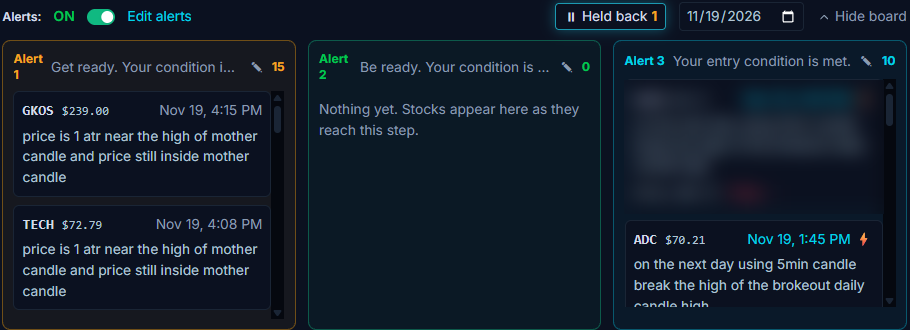
- 1Alerts on. Switch them on or off any time.
- 2Alert 1: get ready. Stocks your first step has found.
- 3Alert 2: be ready. The setup is forming.
- 4Alert 3: your entry condition is met.
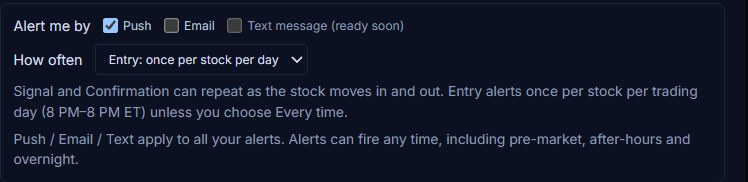
- 1Push or email. Text messages coming soon.
- 2How often: once, once a day or every time.
A screener is a filter, not a pick
You write the rules.
SEPT doesn’t pick stocks or tell you what to buy. Every screener is your own.
Same rules everywhere.
Your screener, alerts, backtests and Full Autonomous Trading all run on the same rules and data as the live engine.
The Library is user-made.
Shared screeners come from other users, not from SEPT, and show how many times they’ve been copied, in random order. No “top picks”.
Do the math before you trade a match
Stock screener questions
Is the SEPT stock screener real time?
Yes. Screeners run live in every session, premarket and after hours included. Stocks appear when they start matching and drop out when they stop. Price columns update every second.
Do I need to know how to code?
No. You describe what you want in plain words (English or Chinese). SEPT builds the exact rule and reads it back before it runs. You can change any line.
What can I screen on?
More than 400 fields: price, volume, indicators, fundamentals and earnings, options activity, dark pool prints, insider and congress trades. You can also use SEPT’s own data from every trade, like buying vs. selling pressure, key levels, swing structure and volume compared with normal.
Can a screener alert me?
Yes. Turn alerts on and choose push or email (text messages are coming soon), and how often: once, once a day or every time. You can run several screeners at once, and each one sends its own alerts.
Does SEPT tell me which stocks to buy?
No. SEPT provides tools only. A screener shows stocks that match the rules you wrote. What you trade, and whether you trade, is your decision.
Build your own screener free
Build a screener freeBacktesting · Trading the levels · GOAX AI · Pricing
Example screens only, not a recommendation to trade any stock or setup. SEPT provides tools only; all screeners, setups and trades are yours. Backtest results are hypothetical on past data, fees not included. Past results do not predict future results.