Best technical analysis software for stock traders (2026)
We compared four platforms on what decides results for US stock traders: what the chart works out for you, whether buying vs. selling comes from real trades, and whether you can backtest and automate a screener on 1-minute data. Each tool is strong at something different, so the verdicts say who each one is best for.
SEPT Investing makes one of the tools compared here. Competitor facts come from each company’s own site, checked Nov 21, 2026. Tell us if something changed: /contact.
Side by side
| What we checked | SEPT Investing | TradingView | TrendSpider | Trade Ideas |
|---|---|---|---|---|
| Levels drawn automatically with touch/hold history | Yes. 30+ levels: sessions, opening ranges, pivots, multi-timeframe levels (15m–monthly) with how often each was touched and held | Not listed | Not listed | Not listed |
| Buying vs. selling measured from real trades | Yes. On every bar, plus zones with institutional share | Volume footprint listed on its pricing page [TV-8]. Community script authors note Pine Script buy/sell profiles are estimated from candles [TV-3] | Not listed | Not listed |
| Auto trendlines | Yes (from confirmed swings) | Yes, built-in “Auto Trendlines” [TV-1] | Yes [TS-1] | Not listed |
| Auto Fibonacci | Yes (retracement) | Yes [TV-1] | Yes [TS-1] | Not listed |
| Chart / candlestick pattern detection | Yes (Pattern Finder and the Auto menu: candlestick and chart patterns), with each pattern’s past breakout odds | Yes, built-in auto chart patterns [TV-2] | Yes [TS-1] | Not listed |
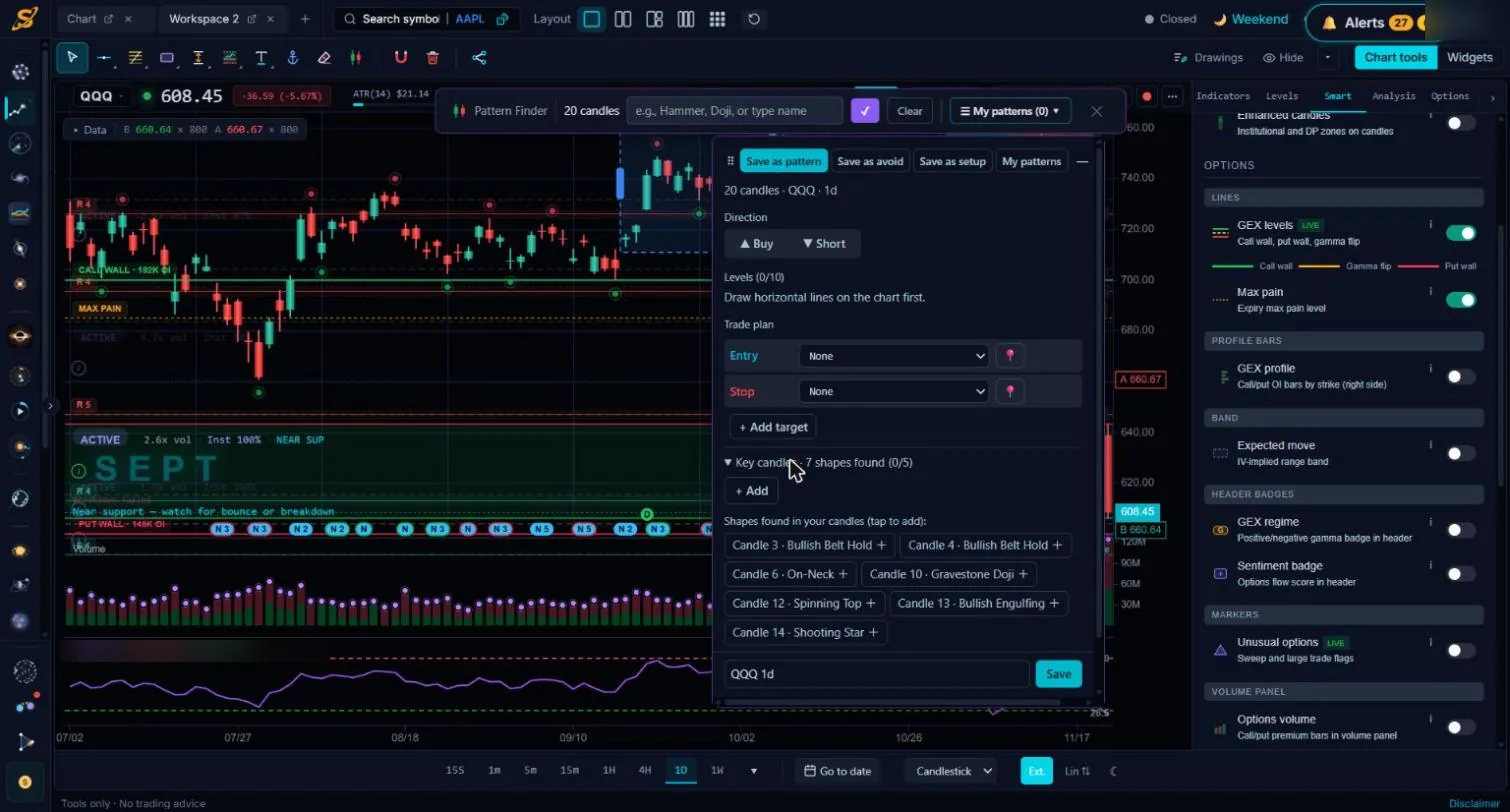
| Turn a pattern on the chart into a backtestable setup | Yes. Select candles → “Save as setup” with entry, stop, targets | Not listed | Not listed | Not listed |
| Built-in indicators | 77, plus no-code custom indicators | 200+ built-in, plus Pine Script (code) [TV-1] | 300+ [TS-1] | Not listed |
| Options and dark-pool data on the chart | Yes (gamma levels, max pain, expected move, unusual options, dark-pool levels) | Options product listed separately [TV-4] | Dark pools and unusual options listed [TS-2] | Not listed |
| Backtest a screener whose stocks change every day | Yes. Runs the screener on each past day and tests every pick | Strategy Tester runs on the chart’s symbol [TV-5]; Pine Screener scans the last 500 bars and isn’t a backtester [TV-6] | Strategy Tester on one symbol, or across a watchlist you load (“Group Strategy Tester”) [TS-3] | Yes, OddsMaker backtests alert/scan strategies [TI-1] |
| 1-minute history for backtests | 10 years on regular plans; back to 2003 (20+ years) on Institutional | 5,000–40,000 intraday bars per chart, by plan [TV-7]; Deep backtesting listed [TV-8] | Long history, depending on the symbol [TS-4] | About 64 days of 1-minute history [TI-2] |
| Premarket and after-hours in backtests | Yes (4:00–19:59 ET) | Depends on chart session settings [TV-5] | Yes, extended hours supported [TS-5] | No, OddsMaker does not backtest premarket or postmarket [TI-1] |
| No-code setups | Yes, plain words → rules | Strategies are written in Pine Script (code) [TV-5] | Yes, no code [TS-4] | Yes, no code [TI-2] |
| Trading costs in backtests | 1¢ per share each way included; results also shown at 2¢; slippage calculator | Configurable in strategy settings [TV-5] | Not listed | Not listed |
| Automation of your own rules | Full Autonomous Trading (supervised, beta; on SEPT paper; own broker coming soon) | Via broker integrations and alerts | Trading bots [TS-1][TS-6] | Holly AI signals; live trading through Brokerage Plus [TI-3] |
| Markets | US stocks and ETFs | Stocks, ETFs, futures, forex, crypto and more | Stocks, futures, crypto, forex | US stocks [TI-3] |
“Not listed” means the feature was not on that company’s own feature pages when we checked (Nov 21, 2026). It may still exist; tell us and we will update the table.
Who each one is best for
SEPT Investing
Best for US stock traders who trade price action and levels and want to test and automate their own setups on real trade data and 1-minute history.
TradingView
Best for the widest indicator and community-script library, every market, and charting with friends.
TrendSpider
Best for automated chart analysis across many markets, with a large indicator library and long history.
Trade Ideas
Best for real-time US stock scanning and AI trade ideas, with quick backtests of scan alerts over recent months.
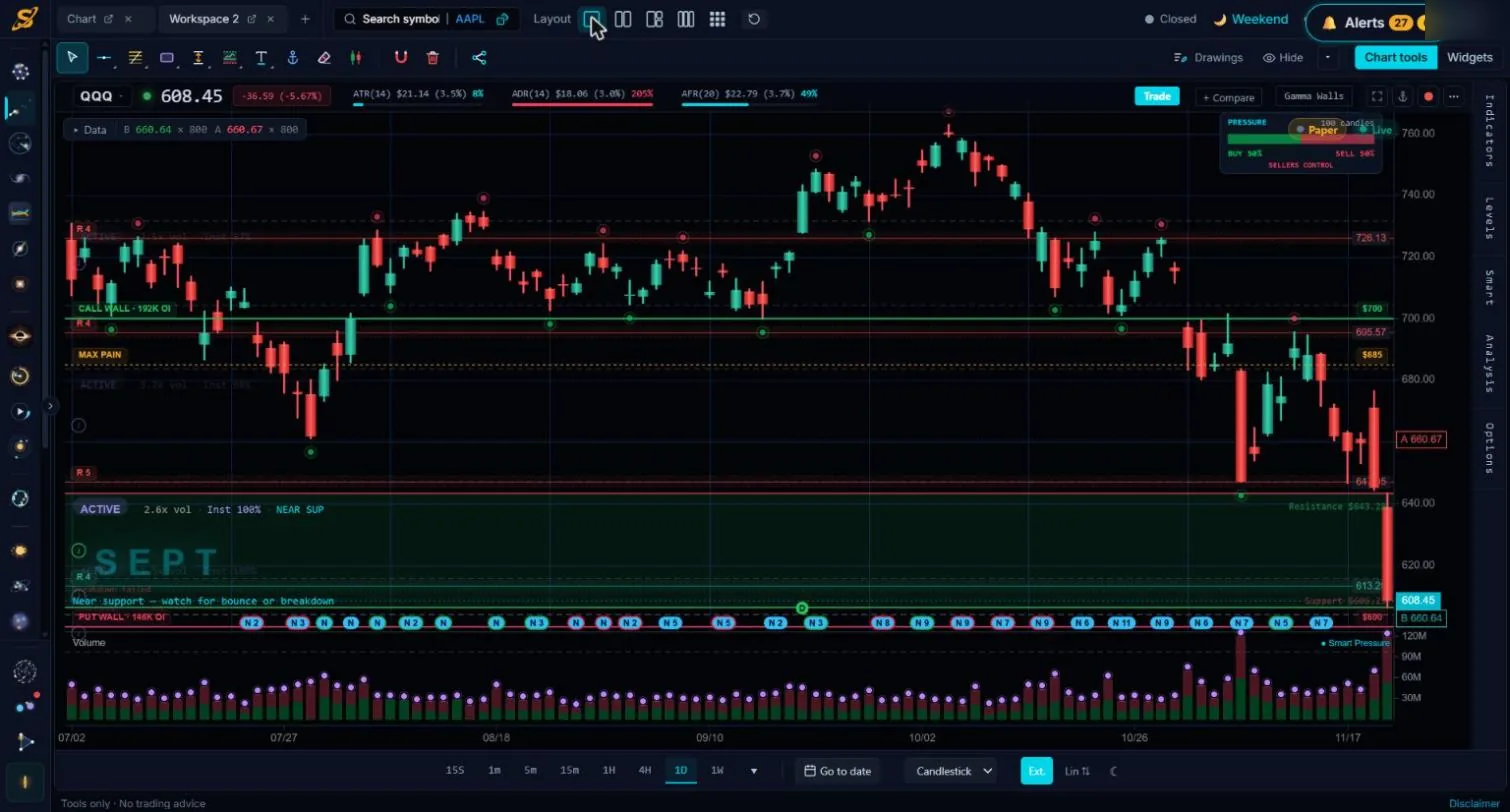
What SEPT’s chart looks like
See everything it works out in the technical analysis overview and on the chart page.
How we compared
- The same questions for each tool.
- Competitor facts from each company’s own pages, linked below, checked Nov 21, 2026.
- SEPT’s own facts from its live app.
FAQ
What is the best technical analysis software for day traders?
It depends on how you trade. For price action and levels on US stocks, with backtesting and automation on real trade data, SEPT Investing. For the widest indicator and script library across markets, TradingView. For automated chart analysis across many markets, TrendSpider. For real-time US stock scanning and AI trade ideas, Trade Ideas.
Which platform measures real buying vs. selling?
SEPT Investing measures buying vs. selling from the trades themselves on every bar. TradingView lists volume footprint on its pricing page, and its community volume-profile script authors note that Pine Script buy/sell profiles are estimated from candles. TrendSpider and Trade Ideas did not list it on their feature pages as of Nov 21, 2026.
Can I backtest a stock screener?
In some tools. SEPT Investing runs your screener on each past day and tests every stock it would have picked, on 1-minute data. Trade Ideas’ OddsMaker backtests scan alerts over about 64 days. TrendSpider’s Group Strategy Tester runs a strategy across a watchlist you load. TradingView’s Strategy Tester runs on the chart’s symbol.
Which tool has the most indicators?
TrendSpider lists 300+ indicators on its pricing page, and TradingView has 200+ built-in indicators plus community scripts written in Pine Script. SEPT Investing has 77 built-in indicators plus custom indicators you write in plain words.
Sources
- [TV-1] TradingView: Built-in indicators (incl. Auto Trendlines, Auto Fib Retracement and Extension). Checked Nov 21, 2026.
- [TV-2] TradingView: Auto chart patterns on TradingView. Checked Nov 21, 2026.
- [TV-3] TradingView community script “Precision Volume Profile [AxeAlgo]” (script author’s note: buy/sell volume is an OHLC-based estimate). Checked Nov 21, 2026.
- [TV-4] TradingView home page (Options in the products menu). Checked Nov 21, 2026.
- [TV-5] TradingView Pine Script docs: Strategies. Checked Nov 21, 2026.
- [TV-6] TradingView: Pine Screener requirements and limitations. Checked Nov 21, 2026.
- [TV-7] TradingView: Historical intraday data, bars and limits explained. Checked Nov 21, 2026.
- [TV-8] TradingView pricing (Volume footprint, Deep backtesting). Checked Nov 21, 2026.
- [TS-1] TrendSpider pricing (300+ indicators, chart pattern recognition, automated trendlines and fibs, trading bots). Checked Nov 21, 2026.
- [TS-2] TrendSpider product overview (Dark Pools, Unusual Options). Checked Nov 21, 2026.
- [TS-3] TrendSpider blog: Group Strategy Tester. Checked Nov 21, 2026.
- [TS-4] TrendSpider help: Understanding Strategy Tester (history depends on symbol, no code). Checked Nov 21, 2026.
- [TS-5] TrendSpider blog: Strategy Tester now supports extended hours. Checked Nov 21, 2026.
- [TS-6] TrendSpider help: Strategy Tester FAQ (“Deploy as a Bot”). Checked Nov 21, 2026.
- [TI-1] Trade Ideas guide: Backtesting / OddsMaker (typically 64 days; no premarket or postmarket). Checked Nov 21, 2026.
- [TI-2] Trade Ideas llms-full.txt (OddsMaker on TI Premium, about 64 days of one-minute history, no code). Checked Nov 21, 2026.
- [TI-3] Trade Ideas llms-full.txt (US stocks, Holly AI signals, live trading through Brokerage Plus). Checked Nov 21, 2026.
Product names are trademarks of their owners. No affiliate links. Data and education only, no investment advice.